
Deleting email addresses
Before you delete an email address, you’ll need to delete any email messages associated with that address.
That’s because deleting an email address also deletes its encryption keys, so any emails tied to that address become permanently unreadable.
If you try to delete an email address without deleting the messages first, you’ll get an error message saying: Address cannot be deleted while messages associated with this address exist

You also cannot delete an address that is linked to any Proton Calendars, Proton Drive volumes, or Proton Pass vaults.
Note: Proton Mail addresses can be deleted once per year, while custom domain addresses do not have this limitation.
How to delete an email address
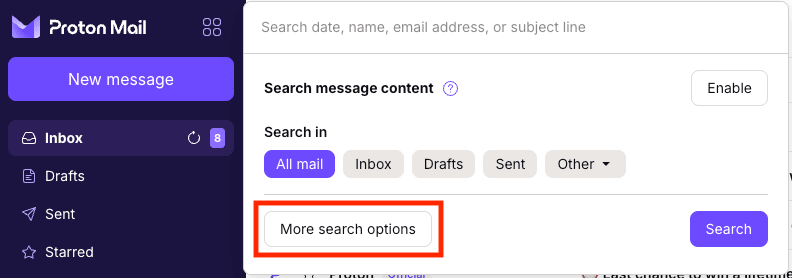
1. Check that all emails associated with the address you want removed are deleted. The easiest way to do this is with an advanced search. Select the Search messages bar → More search options.
2. Go to the Address field and select the address you want to delete from the dropdown menu. This will locate all messages associated with the address that needs to be deleted.

3. Check the Select all box at the top of your search box, then click the Trash icon. If the search results contain more than 50 messages, you’ll need to delete them one page at a time.

4. Now click on Trash in the left sidebar. Select all emails by checking the box at the top, and permanently delete them by clicking on the X button.

5. You should now be able to delete your email address. Select Settings → All settings at the top right of your inbox. Then, from the left sidebar, select Identity and addresses.
6. Go to My addresses and find the email address you want to delete. Click the down arrow in the Actions column, and select Delete address.

7. A pop-up will appear, asking you to confirm that you want to delete the address. If you’re sure, select Delete address to confirm. You may also be asked to enter your password.

Your email address is now deleted.